
Office skills
Excel, beginner level
Employees with no Excel experience or only very occasional use.
← All courses · View the catalogue
2 days (14 h)
Employees with no Excel experience or only very occasional use.
Course objectives
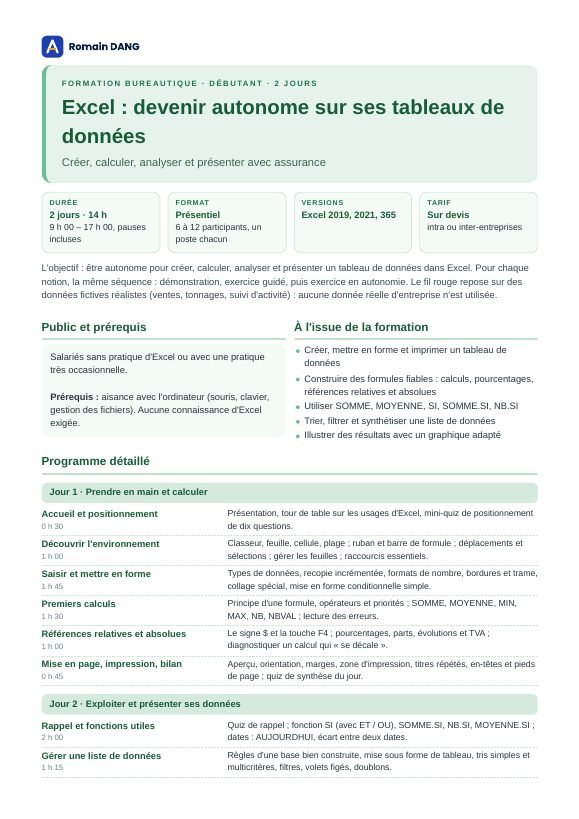
- Create, format and print a data table
- Build reliable formulas (calculations, percentages, relative and absolute references)
- Use the basic functions: SUM, AVERAGE, IF, SUMIF, COUNTIF
- Sort, filter and summarise a data list
- Illustrate results with a suitable chart
Programme for the two days
- Day 1 · Welcome and placement (30 min)
- Day 1 · Discovering the environment (1 h)
- Day 1 · Entering and formatting data (1 h 45)
- Day 1 · First calculations (1 h 30)
- Day 1 · Relative and absolute references (1 h)
- Day 1 · Page layout, printing and day review (45 min)
- Day 2 · Recap and useful functions: IF, SUMIF, COUNTIF, dates (2 h)
- Day 2 · Managing a data list: table, sorting, filters (1 h 15)
- Day 2 · Charts (1 h 15)
- Day 2 · Introduction to pivot tables (1 h)
- Day 2 · Assessed summary case and wrap-up (1 h)
How the course runs
- A practical case at every step, to learn by doing.
- Materials given to each participant, usable after the course.
- Content adapted to your tools, your jobs and your level.
- A clear starting point and finish line: you know what you will be able to do.
In person · 6 to 12 participants · one computer per trainee (Excel 2019, 2021 or 365)
Prerequisites
Comfortable with a computer: mouse, keyboard, file management. No Excel knowledge required.
Key strengths
- A running case with realistic fictional data (sales, tonnages, activity tracking), no real company data
- For each topic: demonstration, guided exercise, then independent exercise
- Fourteen exercises with workbooks to complete, and solutions
- A step-by-step guide to redo the exercises independently
- A group of 6 to 12 people, one computer per trainee
Assessment
- Placement quiz at the start, recap and summary quiz each day
- Summary case assessed against a criteria grid
- Satisfaction questionnaire
Materials given to trainees
- Illustrated PowerPoint course material
- Exercise workbooks with cells to complete
- Exercise solutions
- Step-by-step guide to redo the exercises independently
Computers equipped with Excel 2019, 2021 or 365. Possible follow-up: an intermediate-level course (see “Excel, from beginner to intermediate”).
What you receive
Every trainee leaves with a trainee workbook, the exercise files with their solutions, and quick-reference sheets to keep at hand. Everything remains usable after the course.
Duration and content adapted to your level, your sector and your schedule.
A question about this course?
Reply within 48 working hours. Free quote, no obligation.